How x402 secures data access
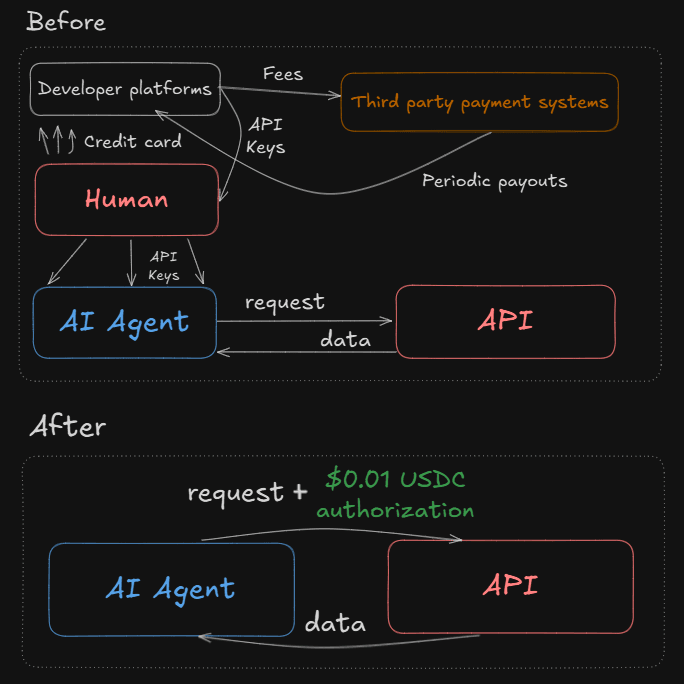
x402 replaces static API keys with dynamic, on-chain payment proofs, ensuring that every data request is backed by a verified transaction. Traditional API keys are fragile; once leaked, they grant indefinite access to premium research feeds. x402 shifts this model by requiring a successful payment for every response, effectively turning the HTTP 402 status code into a gatekeeper.
When a client requests a premium endpoint, the server responds with a 402 Payment Required, including a specific payment instruction. The client must then execute a transaction—typically a small USDC transfer on Base—and return the transaction hash in the next request. This creates a tight loop where data access is inextricably linked to payment settlement. There are no expired tokens or revoked keys to manage; the payment itself is the credential.
This approach is particularly robust for high-value research feeds. Because the payment happens at the protocol level, you eliminate the risk of unauthorized data scraping that plagues key-based systems. Every byte of data delivered is accounted for, and the settlement is instant and verifiable on-chain. For engineering teams, this means cleaner access control logic and a direct correlation between data usage and revenue.
Set up the x402 facilitator
Before your API endpoints can accept payments, you need an infrastructure layer that handles discovery and transaction routing. The Coinbase Developer Platform (CDP) Bazaar serves as this discovery layer, cataloging x402-enabled services so AI agents and clients can find them. The facilitator acts as the bridge between your application and the Base network, managing the payment flow and ensuring your endpoints are properly registered.
Setting up this facilitator is the foundational step for any x402 implementation. It involves configuring your CDP wallet, connecting to the Base network, and defining the specific endpoints you want to monetize. Without this configuration, your premium data remains invisible to the x402 ecosystem, and agents won't know where to send their micropayments.
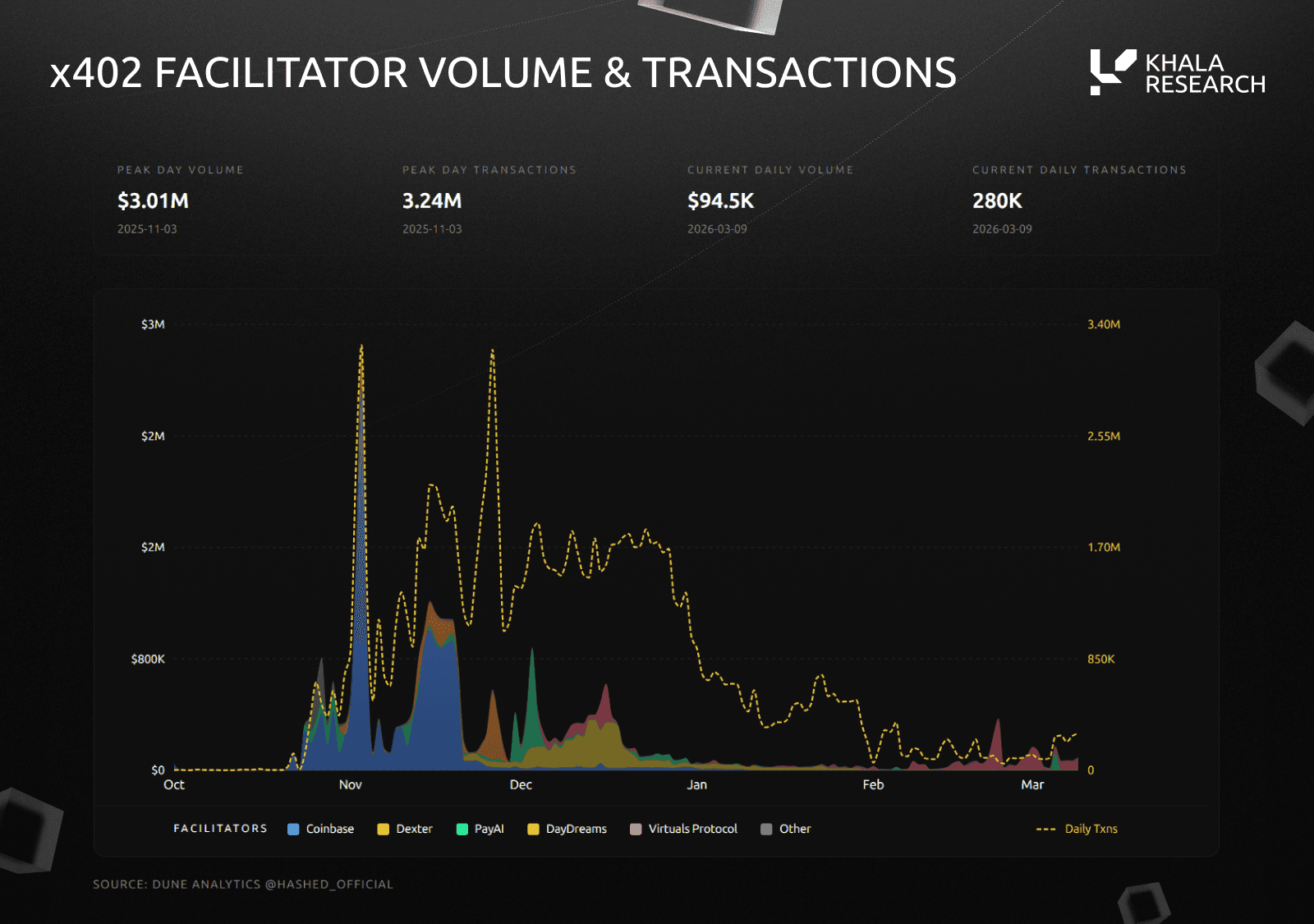
Start by creating a dedicated Coinbase Developer Platform wallet. This wallet will hold the funds for transaction fees and receive the payments for your data. Ensure you have access to the Base network, as x402 transactions are settled there. You can generate API keys from the CDP dashboard to authenticate your application with the facilitator.
Register your API endpoints with the CDP Bazaar. This involves specifying the URL, the data type, and the price per request. The facilitator will verify your configuration and make your service discoverable to other developers and AI agents. You can browse existing listings on the Bazaar to see how others have structured their endpoints.
Run a test transaction to ensure your facilitator is correctly routing payments. Use a small amount of Base ETH to simulate a request. Check the transaction hash on a Block Explorer to confirm the payment was received and the data was delivered. This step verifies that your payment logic and endpoint integration are working as intended.
Once your facilitator is live, your endpoints are ready to accept x402 payments. This setup allows you to monetize premium research feeds directly, bypassing traditional subscription models. The CDP Bazaar ensures that your service is easily discoverable, while the facilitator handles the complex blockchain interactions behind the scenes.
Return HTTP 402 with payment instructions
The first critical step in building an x402 endpoint is handling the "unpaid" state. When a client—whether a human user or an AI agent—requests premium data without valid payment, your server must not return a standard 401 (Unauthorized) or 404 (Not Found). Instead, you return a 402 Payment Required status code.
This status code is the backbone of the x402 protocol. It signals to the client that the resource exists and is accessible, but a payment is required to unlock it. Unlike traditional API gates that rely on API keys or OAuth tokens, x402 uses HTTP status codes to drive a micro-transaction flow directly over the web.
The 402 Response Structure
A compliant x402 response does more than just set the status code. It must include specific headers and a body that guide the client toward completing the payment. The client needs to know exactly how much to pay, in which currency, and where to send the funds.
Key components of the response include:
X-HTTP-Status-Code: While the HTTP status is 402, some frameworks may require this header to explicitly confirm the intent.X-Required-Payment: Specifies the amount and currency (e.g.,USDConBasechain).X-Payment-URLorX-Payment-Instructions: Provides a direct link or structured data for the client to initiate the transaction. This could be a smart contract address, a payment portal URL, or a QR code for mobile wallets.
Example Response
Here is what a typical x402 response might look like in a Next.js API route:
export async function GET(request) {
  // Check for payment or authentication
  const isPaid = await checkPayment(request);

  if (!isPaid) {
    return new Response(
      JSON.stringify({
        message: "Payment required for premium data.",
        paymentRequired: true,
        amount: "1.00",
        currency: "USDC",
        chain: "base",
        paymentUrl: "https://your-app.com/pay?endpoint=premium-data"
      }),
      {
        status: 402,
        headers: {
          "Content-Type": "application/json",
          "X-Required-Payment": "1.00 USDC on Base",
          "X-Payment-URL": "https://your-app.com/pay?endpoint=premium-data"
        }
      }
    );
  }

  // Return data if paid
  return Response.json({ data: "Premium research data here..." });
}
Why 402, Not 401?
Using 401 implies the request is invalid or the user is unauthenticated. Using 402 implies the request is valid, but the economic barrier hasn't been cleared. This distinction is vital for agent-to-agent commerce. An AI agent can programmatically parse the 402 response, understand the cost, and decide whether to pay or skip the endpoint. A 401 would force the agent to handle authentication logic, which is often unnecessary for simple pay-per-use data feeds.
By returning a structured 402 response, you enable seamless, automated payments without requiring users to log in or manage complex wallet connections upfront.
Verify payment proof on subsequent requests
After the client settles the initial 402 payment, they must present proof to access the premium research data. This is not a one-time handshake. For every subsequent request to your endpoint, the client must include the payment proof in the headers. Your server’s job is to validate this proof before returning any sensitive data.
Think of the initial payment as buying a ticket and the payment proof as the boarding pass. You don’t let someone onto the plane with just a receipt; you need the specific, verifiable credential for that journey. In the x402 standard, the proof is typically a signed message or a transaction ID that proves the payment was made.
1. Extract the proof from headers
Most x402 implementations expect the payment proof in a specific header, often Authorization or a custom header like X-Payment-Proof. Extract this value from the incoming request immediately. If the header is missing, return a 402 error again, instructing the client to pay. Do not proceed with data retrieval.
2. Validate the signature or transaction
Once you have the proof, you need to verify it. If the payment was made on-chain, you can check the transaction hash against a block explorer. If it’s a signed message, verify the signature against the client’s public key. This step ensures the proof is authentic and hasn’t been tampered with.
3. Check for replay attacks
A critical security step is preventing replay attacks. Ensure that the payment proof has not been used before. You can do this by storing a list of used proof IDs or transaction hashes in a database or cache. If the proof has already been used, reject the request. This protects your premium data from being accessed multiple times with a single payment.
4. Grant access to the data
If the proof is valid and hasn’t been used before, grant the client access to the premium research feed. Return the data in the response body with a 200 OK status. If any validation step fails, return a 402 error with a clear message explaining what went wrong, so the client can fix their implementation.
Handle payment expiry and refresh
Access tokens for premium research feeds aren't permanent. When a payment expires, your x402 endpoint must handle the transition gracefully, ensuring clients know exactly how to regain access without breaking their data pipeline. This lifecycle management relies on clear HTTP signals and predictable refresh logic.
Before returning a 402, your server checks the token's exp (expiration) claim. If the timestamp has passed, you immediately treat the request as unpaid. Do not serve stale data. Instead, return a 402 Payment Required status with a Pay-Url header pointing to your payment gateway.
The 402 response should include specific instructions. Include a Pay-Url header for the payment link and a Payee header for your wallet address. Optionally, add a Pay-Description header explaining that the token has expired and needs renewal. This clarity reduces support tickets and speeds up the renewal process.
Once the client pays, they receive a new signed token. Your endpoint must validate this new signature and expiration time. Verify the token against your public key or registry. If valid, grant access to the premium research feed. If invalid, return the 402 again with updated instructions.
For long-running agents, implement a refresh loop. When the client receives a 402, it should trigger a payment flow in the background. Once the new token is obtained, the client retries the request with the updated Authorization header. This ensures minimal downtime for critical data streams.
By automating this cycle, you ensure that premium research feeds remain accessible only to paying users, while maintaining a smooth experience for legitimate clients. The key is consistency: always return 402 when access is denied due to payment issues, and never serve data without a valid, current token.
Helpful gear
Use these product recommendations as a starting point, then choose the size, material, and price point that fit how you actually use the gear.


As an Amazon Associate, we may earn from qualifying purchases.
No comments yet. Be the first to share your thoughts!